
Skip to content · ഉള്ളടക്കത്തിലേക്ക്

മലയാളത്തിൽ AI-യോട് എങ്ങനെ ചാറ്റ് ചെയ്യാംHow to chat with AI in Malayalam

By Alan Varghese Shaji · Updated

മൂന്ന് ഭാഗങ്ങൾ ചേർന്ന് വ്യക്തമായ ഒരു ചോദ്യമാകുന്നതിന്റെ ചിത്രീകരണം.

ചെയ്യേണ്ട കാര്യം, ആവശ്യമായ പശ്ചാത്തലം, മറുപടി വേണ്ട രൂപം എന്നിവ പറയൂ. വ്യക്തമല്ലെങ്കിൽ വീണ്ടും ചോദിക്കൂ.

Give the task, useful context and the format you want. Then ask a follow-up if anything is unclear.

Illustration of three coloured prompt blocks joining into one clear speech bubble beside a phone.

AI ഉപയോഗിച്ച് തയ്യാറാക്കിയ ചിത്രംAI-generated visual

Engane.AI-യിൽ സൈൻ ഇൻ ചെയ്ത്, ചോദ്യം മലയാളത്തിലോ മംഗ്ലീഷിലോ ടൈപ്പ് ചെയ്താൽ മതി — മറുപടി മലയാളത്തിൽ കിട്ടും. മലയാളം ടൈപ്പിങ് ഓണായിരിക്കുമ്പോൾ മംഗ്ലീഷ് വാക്കുകൾ മലയാളം ലിപിയിലാകും. സൗജന്യ പ്ലാനിൽ ദിവസവും 25 സന്ദേശങ്ങൾ വരെ, മാസത്തെ സൗജന്യ പരിധിക്കുള്ളിൽ; വെബ്സൈറ്റിലും Android ആപ്പിലും ഉപയോഗിക്കാം.

Sign in to Engane.AI and type a question in Malayalam or Manglish to get a Malayalam reply. With Malayalam typing enabled, Manglish words become Malayalam script. The free plan includes up to 25 messages a day within a monthly usage limit, on the web and Android. No credit card is needed.

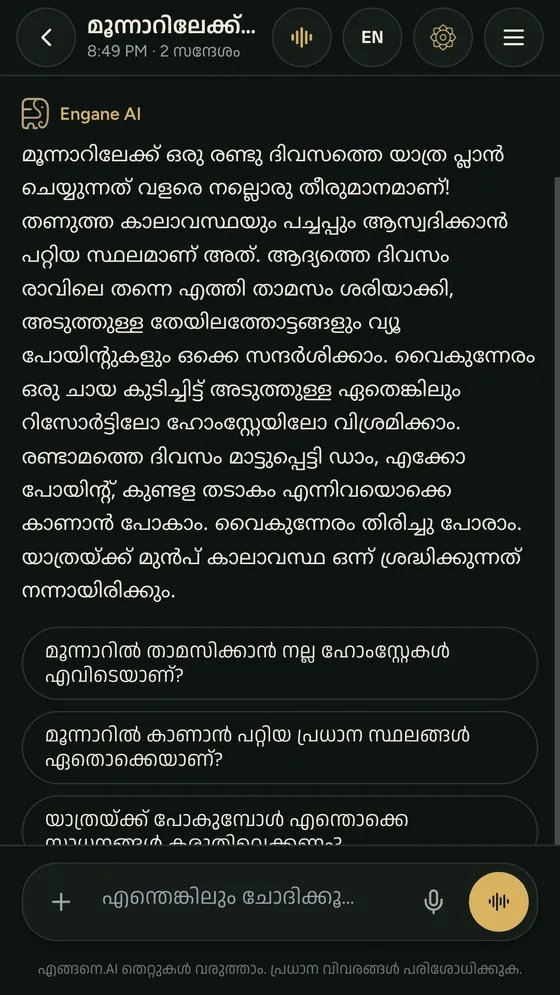
Engane.AI on a phone: a Malayalam reply about a trip to Munnar
Engane.AI ആപ്പിന്റെ യഥാർത്ഥ സ്ക്രീൻActual Engane.AI app screenshot

മലയാളം

തുടങ്ങാൻ നാല് പടികൾ

സൈൻ ഇൻ ചെയ്ത് ചാറ്റ് തുറന്ന് ആദ്യ ചോദ്യം അയക്കാം.

  1. engane.ai തുറക്കൂ, അല്ലെങ്കിൽ Google Play-ൽ നിന്ന് Android ആപ്പ് എടുക്കൂ.
  2. Google അക്കൗണ്ട് വഴിയോ ഇമെയിൽ വഴിയോ സൈൻ ഇൻ ചെയ്യൂ. ഇമെയിൽ ഉപയോഗിച്ച് പുതിയ അക്കൗണ്ട് തുടങ്ങുമ്പോൾ ലഭിക്കുന്ന ലിങ്കിൽ ക്ലിക്ക് ചെയ്ത് ഇമെയിൽ സ്ഥിരീകരിക്കണം. കാർഡ് വേണ്ട.
  3. താഴെയുള്ള ബോക്സിൽ ചോദ്യം ടൈപ്പ് ചെയ്യൂ — മലയാളം ലിപിയിലോ മംഗ്ലീഷിലോ, രണ്ടും കലർത്തിയോ.
  4. അയച്ചാൽ മറുപടി മലയാളത്തിൽ വരും. സംശയം ബാക്കിയുണ്ടെങ്കിൽ അതേ ചാറ്റിൽ തുടർചോദ്യം ചോദിക്കാം — മുൻ സന്ദേശങ്ങൾ AI ഓർക്കും.

ആദ്യമായി വരുമ്പോൾ പേര്, ഭാഷ, ജില്ല എന്നിവ ചോദിക്കുന്ന ഒരു ചെറിയ സ്ക്രീൻ കാണാം. വിവരങ്ങൾ നൽകി തുടങ്ങാം, അല്ലെങ്കിൽ ഇപ്പോൾ ഒഴിവാക്കാം. ചാറ്റ് തുറക്കാൻ ഹോം സ്ക്രീനിലെ ചാറ്റ് തിരഞ്ഞെടുക്കുക.

ആദ്യ ചോദ്യമായി ഇത് പരീക്ഷിക്കാം

ഒരു ചോദ്യം പകർത്തി അയച്ച് തുടർചോദ്യത്തിലൂടെ മറുപടി മെച്ചപ്പെടുത്താം.
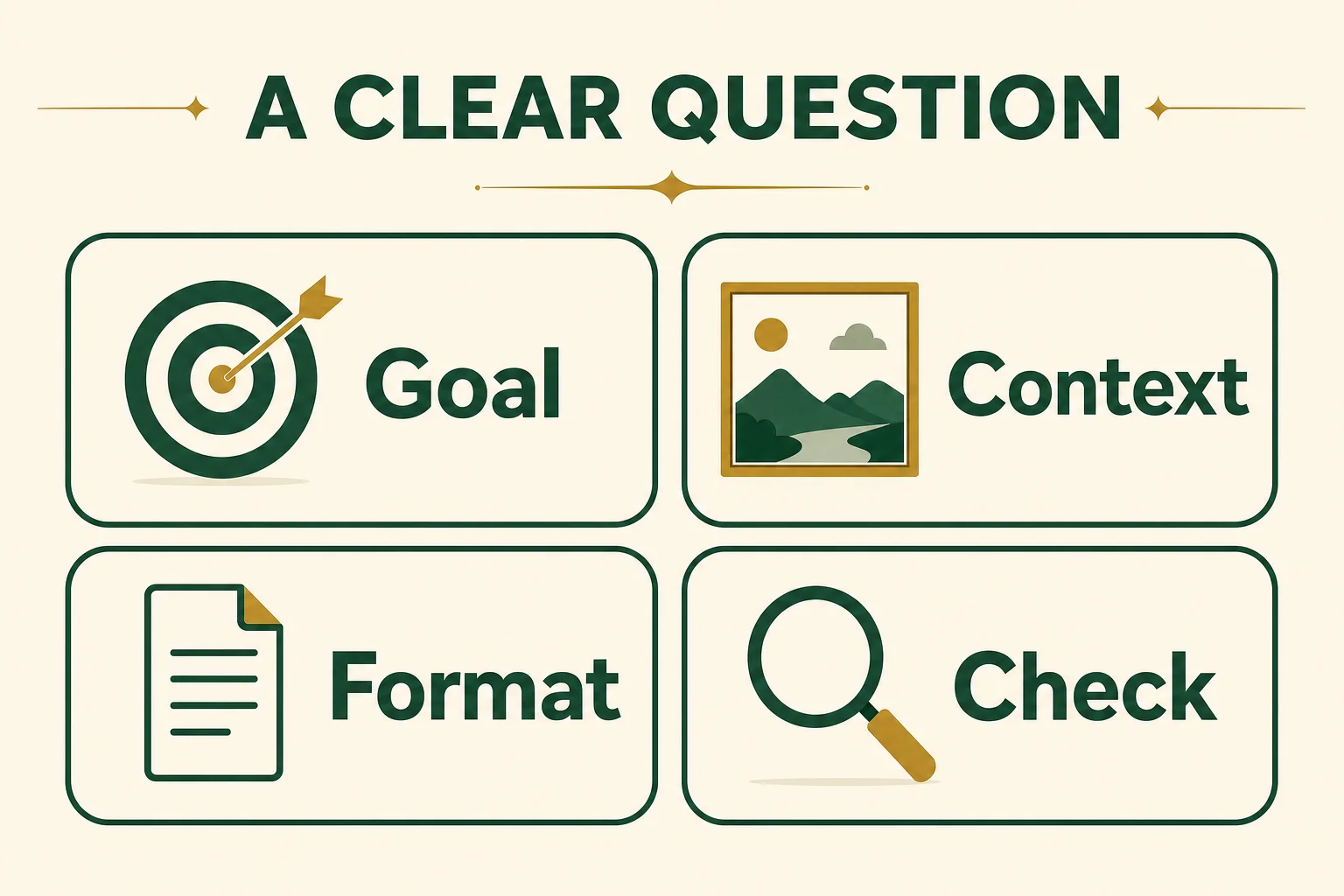
വ്യക്തമായ ചോദ്യത്തിന്റെ നാല് ഭാഗങ്ങൾ: ലക്ഷ്യം, പശ്ചാത്തലം, മറുപടിയുടെ രൂപം, പരിശോധന.

എന്ത് വേണമെന്ന് പറയൂ, ആവശ്യമായ പശ്ചാത്തലം ചേർക്കൂ, രൂപം തിരഞ്ഞെടുക്കൂ, മറുപടി പരിശോധിക്കൂ.

AI ഉപയോഗിച്ച് തയ്യാറാക്കിയ ചിത്രം

താഴെയുള്ള ഉദാഹരണ ചോദ്യം പകർത്തി ചാറ്റിൽ അയക്കാം. ക്ലാസും വിഷയവും നിങ്ങളുടെ ആവശ്യത്തിന് മാറ്റാം.

ഏഴാം ക്ലാസിലെ കുട്ടിക്ക് മനസ്സിലാകുന്ന മലയാളത്തിൽ പ്രകാശസംശ്ലേഷണം വിശദീകരിക്കൂ. വീട്ടിൽ കാണുന്ന ഒരു ഉദാഹരണവും അവസാനം മൂന്ന് ചോദ്യങ്ങളും ചേർക്കൂ.

ഉത്തരം കിട്ടിയാൽ “ഇത് മൂന്ന് വരിയിൽ ചുരുക്കൂ” എന്നോ “രണ്ടാമത്തെ ചോദ്യം വിശദീകരിക്കൂ” എന്നോ തുടർചോദ്യം ചോദിക്കാം. പഠനത്തിന് ഉപയോഗിക്കുമ്പോൾ പാഠപുസ്തകവുമായി ഒത്തുനോക്കുക.

മംഗ്ലീഷിൽ എഴുതിയാലും മതി

മലയാളം ഇംഗ്ലീഷ് അക്ഷരങ്ങളിൽ എഴുതി ശരിയായ വാക്ക് തിരഞ്ഞെടുക്കാം.

ലാപ്‌ടോപ്പും ഫോണും കുറിപ്പുപുസ്തകവും ഉപയോഗിച്ച് ടൈപ്പ് ചെയ്യുന്ന സാങ്കൽപ്പിക വ്യക്തി.

നിങ്ങൾക്ക് എളുപ്പമുള്ള ഉപകരണവും ടൈപ്പിംഗ് രീതിയും തിരഞ്ഞെടുക്കൂ. അയയ്ക്കും മുമ്പ് വാക്കുകൾ പരിശോധിക്കൂ. AI സൃഷ്ടിച്ച ഉദാഹരണ ചിത്രം; വ്യക്തികൾ സാങ്കൽപ്പികമാണ്.

AI ഉപയോഗിച്ച് തയ്യാറാക്കിയ ചിത്രം

മലയാളം കീബോർഡ് ഇല്ലെങ്കിലും പ്രശ്നമില്ല. “oru cheriya katha parayamo” എന്ന് ഇംഗ്ലീഷ് അക്ഷരങ്ങളിൽ എഴുതിയാൽ, ഓരോ വാക്കും പൂർത്തിയാക്കി സ്പേസ് അടിക്കുമ്പോൾ അത് മലയാളം ലിപിയായി മാറും. വേറെ രൂപം വേണമെങ്കിൽ ബോക്സിന് മുകളിൽ വരുന്ന നിർദേശങ്ങളിൽ നിന്ന് തിരഞ്ഞെടുക്കാം.

  • CBSE, PDF, NRI പോലുള്ള വലിയക്ഷര ചുരുക്കെഴുത്തുകൾ അതുപോലെ തന്നെ നിൽക്കും.
  • അക്കങ്ങളുള്ള വാക്കുകളും (mp3, 10th) ലിങ്കുകളും മാറില്ല.
  • മുഴുവൻ ഇംഗ്ലീഷിൽ എഴുതണമെങ്കിൽ EN/ML സ്വിച്ച് ഉപയോഗിക്കാം.

ടൈപ്പിങ്ങിനെക്കുറിച്ച് കൂടുതൽ: ഫോണിലും കമ്പ്യൂട്ടറിലും മലയാളം ടൈപ്പ് ചെയ്യാൻ.

എന്തൊക്കെ ചോദിക്കാം

എഴുത്ത്, വിശദീകരണം, വാർത്ത, പ്രാദേശിക വിവരം എന്നിവയ്ക്ക് സഹായം ചോദിക്കാം.

ആവശ്യംഉദാഹരണം
കത്ത്, അപേക്ഷ, മെസേജ്“ബാങ്കിലേക്ക് ഒരു അപേക്ഷ മലയാളത്തിൽ എഴുതിത്തരാമോ?”
പഠന സംശയം“പ്രകാശസംശ്ലേഷണം ലളിതമായി പറഞ്ഞുതരൂ”
ഇന്നത്തെ വാർത്ത“ഇന്ന് കേരളത്തിലെ പ്രധാന വാർത്തകൾ”
കാലാവസ്ഥ“നാളെ തൃശ്ശൂരിൽ മഴ പെയ്യുമോ?”
അടുത്തുള്ള സേവനങ്ങൾ“കോന്നിയിലെ ഇലക്ട്രീഷ്യന്മാർ”
വിവർത്തനം, അർഥം“ഈ ഇംഗ്ലീഷ് മെയിൽ മലയാളത്തിൽ പറഞ്ഞുതരൂ”

വാർത്തയ്ക്കായി AI വെബിൽ തിരയുന്നു; ഉപയോഗിച്ച ഉറവിടങ്ങൾ മറുപടിക്ക് താഴെ കാണാം. കാലാവസ്ഥാ വിവരങ്ങൾ ഒരു പ്രവചന സേവനത്തിൽ നിന്നാണ് ലഭിക്കുന്നത്. കൂടുതൽ: കേരള ജീവിതത്തിന് മലയാളം AI.

നല്ല മറുപടി കിട്ടാൻ ചില ടിപ്പുകൾ

ആർക്ക്, എത്ര നീളം, എന്തിനുവേണ്ടി എന്ന് പറയുക; പ്രധാന വിവരങ്ങൾ പരിശോധിക്കുക.

  • എന്തിനാണ് വേണ്ടത് എന്ന് പറയൂ: “ഏഴാം ക്ലാസുകാരന് മനസ്സിലാകുന്ന പോലെ”, “ഔദ്യോഗിക ഭാഷയിൽ”.
  • നീളം പറയാം: “മൂന്ന് വരിയിൽ”, “പോയിന്റുകളായി”.
  • ഫോട്ടോയോ ഡോക്യുമെന്റോ ചേർത്ത് അതിനെക്കുറിച്ച് ചോദിക്കാം — ഉദാഹരണത്തിന് ഒരു ബില്ലോ നോട്ടീസോ.
  • മറുപടി ഉറക്കെ കേൾക്കാൻ സ്പീക്കർ ബട്ടൺ അമർത്തൂ; സംസാരിച്ചുതന്നെ ചോദിക്കാൻ വോയ്‌സ് മോഡ്.
  • പ്രധാനപ്പെട്ട കാര്യങ്ങൾ (പണം, നിയമം പോലുള്ളവ) ഔദ്യോഗിക ഉറവിടങ്ങളിൽ ഒന്നുകൂടി ഉറപ്പാക്കൂ — AI-ക്കും തെറ്റ് പറ്റാം.

ചെലവ് എത്ര?

സൗജന്യ ഉപയോഗത്തിന് ദിവസവും മാസവും പരിധിയുണ്ട്; കൂടുതലിന് ക്രെഡിറ്റുകളും പ്ലാനുകളും.

  • സൗജന്യ പ്ലാനിൽ ദിവസവും 25 സന്ദേശങ്ങൾ വരെ (അതിൽ 5 വരെ വോയ്‌സ്), മാസത്തെ സൗജന്യ പരിധിക്കുള്ളിൽ.
  • അതിൽ കൂടുതൽ വേണമെങ്കിൽ ക്രെഡിറ്റുകൾ വാങ്ങാം (1 ക്രെഡിറ്റ് = ₹1; ₹10 മുതൽ) — ഒരു സാധാരണ ടെക്സ്റ്റ് മറുപടിക്ക് ഒരു ക്രെഡിറ്റിൽ താഴെയേ വരൂ.
  • സാധാരണ മാസ പ്ലാനുകൾ ₹400, ₹800, ₹1,500. നിലവിലെ ഓഫറുകളും പരിധികളും വില വിവരം പേജിൽ കാണാം.

പതിവ് ചോദ്യങ്ങൾ

മലയാളം അറിയുന്ന AI ഉണ്ടോ?

ഉണ്ട്. Engane.AI മലയാളത്തിൽ ചോദ്യം മനസ്സിലാക്കി മലയാളത്തിൽ മറുപടി നൽകാൻ വേണ്ടി ഉണ്ടാക്കിയ ആപ്പാണ്. മലയാളം ലിപിയിലോ മംഗ്ലീഷിലോ എഴുതാം, സംസാരിക്കുകയും ചെയ്യാം.

മലയാളം കീബോർഡ് വേണോ?

വേണ്ട. മംഗ്ലീഷിൽ (ഇംഗ്ലീഷ് അക്ഷരങ്ങളിൽ മലയാളം) ടൈപ്പ് ചെയ്താൽ ആപ്പ് ഓരോ വാക്കും മലയാളം ലിപിയാക്കും.

ഇത് സൗജന്യമാണോ?

സൗജന്യ പ്ലാൻ ഉണ്ട്: ദിവസവും 25 സന്ദേശങ്ങൾ വരെ, മാസത്തെ സൗജന്യ പരിധിക്കുള്ളിൽ. കൂടുതൽ വേണമെങ്കിൽ ക്രെഡിറ്റുകളോ മാസ പ്ലാനോ എടുക്കാം.

ഇംഗ്ലീഷിൽ മറുപടി കിട്ടുമോ?

കിട്ടും. സെറ്റിങ്സിൽ “ഭാഷ · Language” വഴി ആപ്പ് മുഴുവൻ ഇംഗ്ലീഷിലേക്ക് മാറ്റാം, പിന്നെ തിരിച്ച് മലയാളത്തിലേക്കും.

കമ്പ്യൂട്ടറിൽ ഉപയോഗിക്കാമോ?

ഉപയോഗിക്കാം. ഏത് ആധുനിക ബ്രൗസറിലും engane.ai തുറന്ന് സൈൻ ഇൻ ചെയ്താൽ മതി. ഒരേ അക്കൗണ്ട് ഫോണിലും കമ്പ്യൂട്ടറിലും.

AI പറയുന്നതെല്ലാം ശരിയായിരിക്കുമോ?

എപ്പോഴും അല്ല. AI-ക്ക് തെറ്റ് പറ്റാം. വാർത്തയ്ക്കും വെബ് തിരച്ചിലിനും ഉറവിടങ്ങൾ മറുപടിക്ക് താഴെ കാണിക്കും — പ്രധാന കാര്യങ്ങൾ അവിടെ ഉറപ്പാക്കൂ.

English

Get started in four steps

Sign in, open chat and send your first question.

  1. Open engane.ai in any browser, or install the Android app from Google Play.
  2. Sign in with Google or your email. If you register with an email address, verify it using the link sent to your inbox. No credit card is needed.
  3. Type your question in the box at the bottom — in Malayalam script, in Manglish, or a mix of both.
  4. Send it and read the reply in Malayalam. Ask a follow-up in the same chat; the AI keeps the earlier messages in mind.

On your first visit, a short setup screen asks for your preferred name, language and district. You can complete it or choose Skip for now. From the home screen, choose Chat; the Start chatting button on this guide takes you directly to chat after sign-in.

Try a first question

Copy a prompt, then refine the answer with a follow-up.

Four parts of a clear question: Goal, Context, Format, Check.

Say what you want, add useful context, choose the format and check the answer.

AI-generated visual

Copy this example prompt into chat. Change the class level and topic to suit what you are learning.

Explain photosynthesis in Malayalam for a Class 7 student. Include an example from everyday life and finish with three questions.

After the reply, try “Make this three lines” or “Explain the second question.” The follow-up stays in the same conversation. Check study answers against your textbook.

Manglish works too

Type Malayalam sounds in English letters and choose the right spelling.

A fictional person typing at a desk with a laptop, phone and notebook.

Choose the device and input method that feel easiest; check the words before sending. Illustrative AI photo; fictional people.

AI-generated visual

You do not need a Malayalam keyboard. Type “oru cheriya katha parayamo” in English letters, and each word becomes Malayalam script when you finish it with a space. If you meant a different spelling, pick it from the suggestions that appear above the box.

  • Capital-letter acronyms such as CBSE, PDF and NRI stay exactly as you typed them.
  • Words with digits (mp3, 10th) and links are left alone.
  • Want to write plain English? Use the EN/ML switch.

More on typing: how to type Malayalam on a phone and a computer.

What you can ask

Ask for writing help, explanations, news or local information.

What you needExample
A letter, application or message“Write a leave request to my manager in Malayalam”
A study doubt“Explain photosynthesis simply”
Today’s news“The main Kerala news today”
Weather“Will it rain in Thrissur tomorrow?”
Services near you“Electricians in Konni”
Meaning or translation“Tell me what this English email says, in Malayalam”

For news and other current questions the AI searches the web before it answers, and the sources it used appear under the reply. Weather comes from a forecast service. More in Malayalam AI for everyday Kerala life.

Tips for better answers

Give the audience, length and context; verify important details.

  • Say who it is for: “so a Class 7 student understands”, “in formal Malayalam”.
  • Say how long: “in three lines”, “as bullet points”.
  • Attach a photo or a document and ask about it — a bill, a notice or a page of notes.
  • Tap the speaker button to hear a reply read aloud, or switch to voice mode and just talk.
  • Double-check anything important (money, law and the like) with an official source — AI can be wrong.

What it costs

Free use has daily and monthly limits; credits and plans cover more.

  • The free plan gives up to 25 messages a day (up to 5 of them spoken), within a monthly free-usage limit.
  • For more, buy credits (1 credit = ₹1, packs from ₹10) — a typical text reply uses well under one credit.
  • Plans have standard monthly prices of ₹400, ₹800 or ₹1,500. Current offers and limits are on the pricing page.

Questions people ask

Is there an AI that understands Malayalam?

Yes. Engane.AI is built to understand questions in Malayalam and answer in Malayalam. You can write in Malayalam script or Manglish, or speak.

Do I need a Malayalam keyboard?

No. Type in Manglish (Malayalam in English letters) and the app turns each word into Malayalam script.

Is it free?

There is a free plan: up to 25 messages a day within a monthly free-usage limit. Credits and monthly plans are there if you need more.

Can I get replies in English?

Yes. Switch the whole app to English under Settings → “ഭാഷ · Language”, and back to Malayalam whenever you like.

Does it work on a computer?

Yes. Open engane.ai in any modern browser and sign in. The same account works on your phone and your computer.

Are the answers always correct?

Not always — AI can make mistakes. For news and web answers the sources are listed under the reply, so you can check them.

സൗജന്യമായി ചാറ്റ് തുടങ്ങൂ · Start chatting free

സൈൻ ഇൻ ചെയ്ത് തുടങ്ങാം. ദിവസവും മാസവും പരിധികളുള്ള സൗജന്യ പ്ലാൻ; കാർഡ് വേണ്ട.Sign in to start. Free plan with daily and monthly limits; no credit card needed.

Works in any browser on a phone, laptop or desktop. Or get the Android app:

Get it on Google PlayComing soonApp Store

Published by Thompson Consulting (OPC) Private Limited on 2026-09-26 · updated 2026-09-29. The app and website design, code, text, question banks (Personality, IQ, Career — except the public-domain IPIP personality items), Malayalam translations, lesson and report formats, illustrations, animations, videos and music made for Engane.AI are owned by or licensed to Thompson Consulting (OPC) Private Limited and protected by the Copyright Act, 1957 and international copyright law.