Skip to content · ഉള്ളടക്കത്തിലേക്ക്

ഫോണിലും കമ്പ്യൂട്ടറിലും മലയാളം ടൈപ്പ് ചെയ്യാൻHow to type Malayalam on a phone and a computer

By Thompson Cherian · Updated

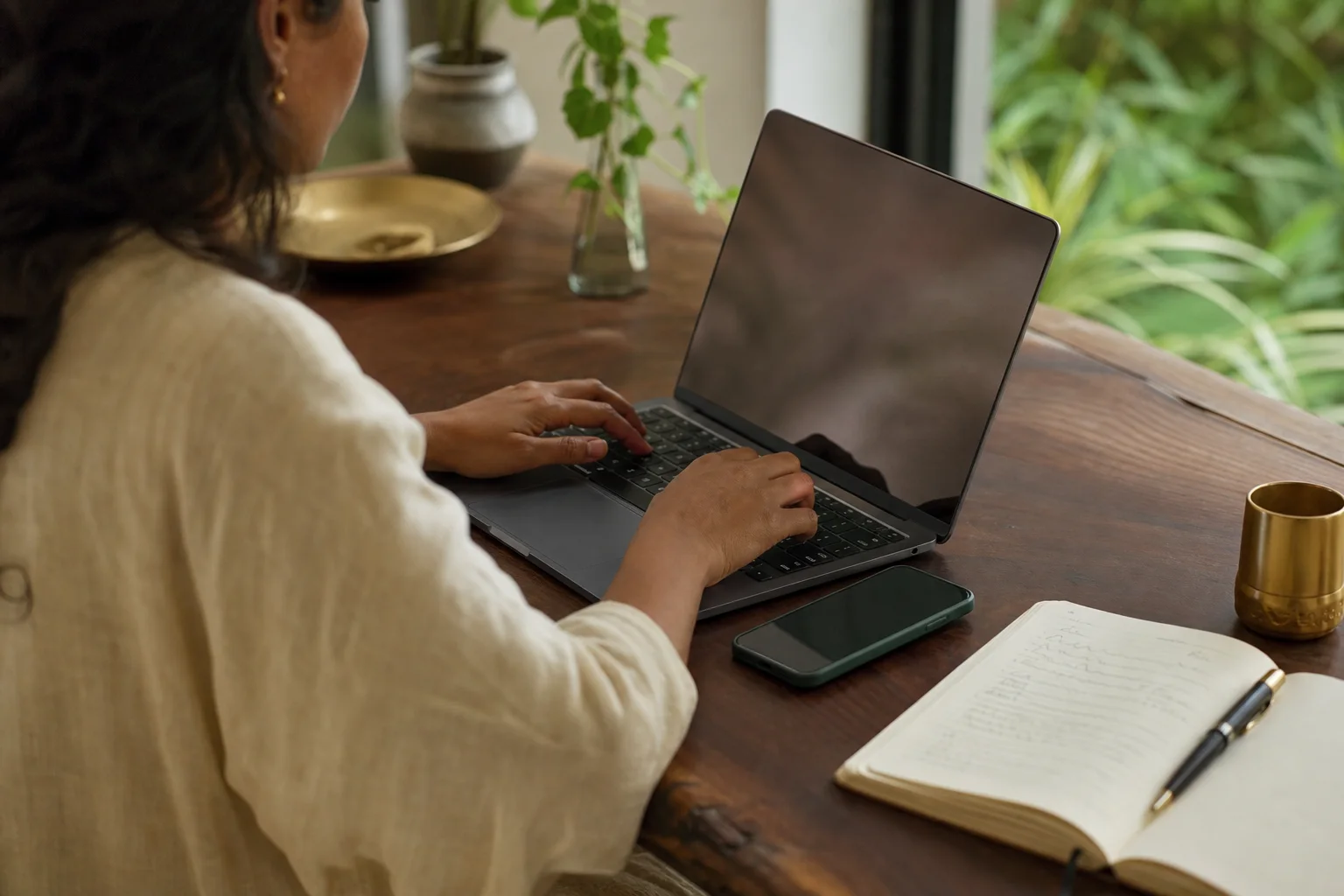
ലാപ്‌ടോപ്പും ഫോണും കുറിപ്പുപുസ്തകവും ഉപയോഗിച്ച് ടൈപ്പ് ചെയ്യുന്ന സാങ്കൽപ്പിക വ്യക്തി.

നിങ്ങൾക്ക് എളുപ്പമുള്ള ഉപകരണവും ടൈപ്പിംഗ് രീതിയും തിരഞ്ഞെടുക്കൂ. അയയ്ക്കും മുമ്പ് വാക്കുകൾ പരിശോധിക്കൂ. AI സൃഷ്ടിച്ച ഉദാഹരണ ചിത്രം; വ്യക്തികൾ സാങ്കൽപ്പികമാണ്.

Choose the device and input method that feel easiest; check the words before sending. Illustrative AI photo; fictional people.

A fictional person typing at a desk with a laptop, phone and notebook.

AI ഉപയോഗിച്ച് തയ്യാറാക്കിയ ചിത്രംAI-generated visual

മലയാളം ടൈപ്പ് ചെയ്യാൻ രണ്ട് എളുപ്പവഴികളുണ്ട്. ഫോണിലോ കമ്പ്യൂട്ടറിലോ മലയാളം കീബോർഡ് ചേർക്കാം. അല്ലെങ്കിൽ Engane.AI-യുടെ ചാറ്റ് ബോക്സിൽ മംഗ്ലീഷിൽ (ഇംഗ്ലീഷ് അക്ഷരങ്ങളിൽ മലയാളം) ടൈപ്പ് ചെയ്യുക; ഓരോ വാക്കും പൂർത്തിയാകുമ്പോൾ തന്നെ മലയാളം ലിപിയിലേക്ക് മാറും. കീബോർഡ് ഒന്നും ഇൻസ്റ്റാൾ ചെയ്യേണ്ട.

There are two easy ways to type Malayalam. Add a Malayalam keyboard to your phone or computer, or type Manglish — Malayalam in English letters — into the Engane.AI chat box, where each word turns into Malayalam script as soon as you finish it. The second way needs no keyboard at all.

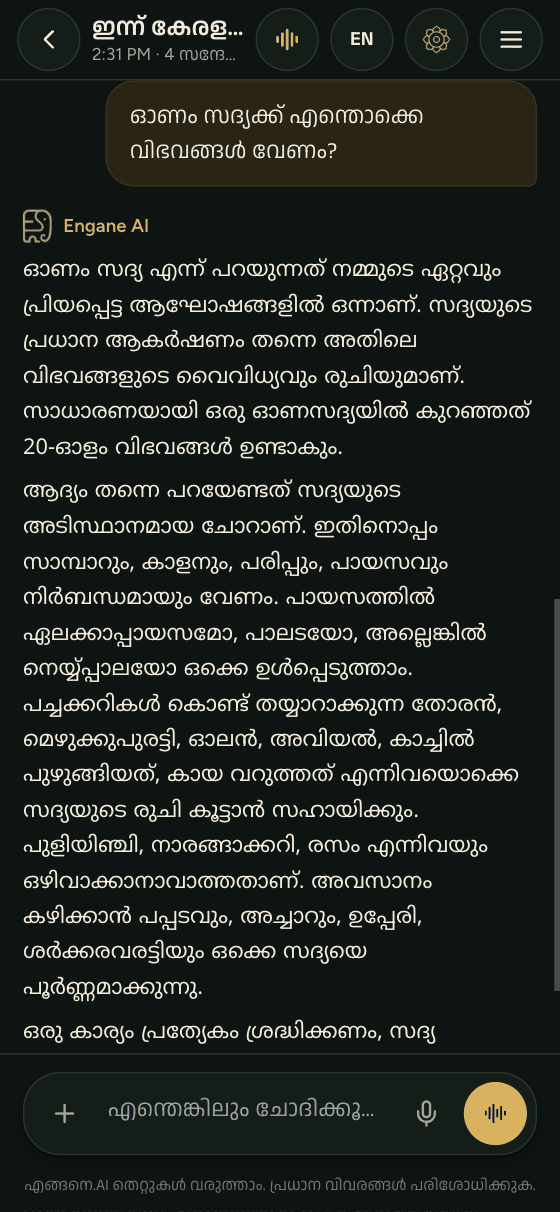
Manglish typed in the Engane.AI chat box turning into Malayalam script
Engane.AI ആപ്പിന്റെ യഥാർത്ഥ സ്ക്രീൻActual Engane.AI app screenshot

മലയാളം

Engane-ൽ മംഗ്ലീഷ് ടൈപ്പ് ചെയ്താൽ മലയാളം

മംഗ്ലീഷ് വാക്ക് പൂർത്തിയാക്കുമ്പോൾ അത് മലയാളം ലിപിയിലാകും.

നമ്മളിൽ പലരും വാട്സാപ്പിൽ "sukhamano?" എന്നൊക്കെയാണ് എഴുതുന്നത്. Engane-ന്റെ ചാറ്റ് ബോക്സിൽ അതുപോലെ തന്നെ ടൈപ്പ് ചെയ്താൽ മതി. ഒരു വാക്ക് കഴിഞ്ഞ് സ്പേസോ കോമയോ ഫുൾ സ്റ്റോപ്പോ ഇടുമ്പോൾ ആ വാക്ക് മലയാളം ലിപിയിലേക്ക് മാറും — "sukhamano" "സുഖമാണോ" ആകും. അവസാനത്തെ വാക്ക് അയക്കുമ്പോൾ മാറും.

  1. സൗജന്യ അക്കൗണ്ട് തുടങ്ങി ചാറ്റ് തുറക്കുക.
  2. ചാറ്റ് ബോക്സ് മലയാളം (ML) മോഡിലാണെന്ന് ഉറപ്പാക്കുക.
  3. മംഗ്ലീഷിൽ ടൈപ്പ് ചെയ്യുക: "nale kochiyil mazha undo".
  4. ഓരോ വാക്കിനും താഴെ വരുന്ന നിർദേശങ്ങളിൽ നിന്ന് ശരിയായ രൂപം തിരഞ്ഞെടുക്കാം.
  5. അയക്കുക. മറുപടി മലയാളത്തിൽ വരും.

ഇംഗ്ലീഷ് വാക്കുകൾ അതുപോലെ നിൽക്കും

ചുരുക്കെഴുത്തുകളും അക്കങ്ങളുള്ള വാക്കുകളും ചില പേരുകളും ഇംഗ്ലീഷിൽ തന്നെ നിൽക്കും.

മലയാളത്തിൽ എഴുതുമ്പോഴും CBSE, PDF, NRI പോലുള്ള ചുരുക്കെഴുത്തുകളും iPhone, WhatsApp പോലുള്ള പേരുകളും ഇംഗ്ലീഷിൽ തന്നെ വേണം. അതിനാൽ ചില വാക്കുകൾ Engane മാറ്റില്ല:

എന്ത് മാറും, എന്ത് മാറില്ല
നിങ്ങൾ ടൈപ്പ് ചെയ്യുന്നത്എന്ത് സംഭവിക്കും
sukhamanoസുഖമാണോ എന്ന് മലയാളം ലിപിയിലാകും
CBSE, PDF (എല്ലാം വലിയ അക്ഷരം)അതുപോലെ നിൽക്കും
mp3, class10 (അക്കം ഉള്ളത്)അതുപോലെ നിൽക്കും
iPhone, WhatsApp (ഇടയിൽ വലിയ അക്ഷരം)അതുപോലെ നിൽക്കും
ഒറ്റ അക്ഷരം (a, I)അതുപോലെ നിൽക്കും

മുഴുവൻ ഇംഗ്ലീഷിൽ എഴുതണമെങ്കിൽ ചാറ്റ് ബോക്സിലെ EN/ML സ്വിച്ച് EN ആക്കിയാൽ മതി.

ഫോണിൽ മലയാളം കീബോർഡ് ചേർക്കാൻ

ഫോണിലെ കീബോർഡ് സെറ്റിങ്സിൽ മലയാളം ചേർക്കാം.

മൂന്ന് ഭാഗങ്ങൾ ചേർന്ന് വ്യക്തമായ ഒരു ചോദ്യമാകുന്നതിന്റെ ചിത്രീകരണം.

ചെയ്യേണ്ട കാര്യം, ആവശ്യമായ പശ്ചാത്തലം, മറുപടി വേണ്ട രൂപം എന്നിവ പറയൂ. വ്യക്തമല്ലെങ്കിൽ വീണ്ടും ചോദിക്കൂ.

AI ഉപയോഗിച്ച് തയ്യാറാക്കിയ ചിത്രം

മറ്റ് ആപ്പുകളിലും മലയാളം ടൈപ്പ് ചെയ്യണമെങ്കിൽ ഫോണിന്റെ കീബോർഡിൽ മലയാളം ചേർക്കാം. മെനുവിന്റെ പേരുകൾ ഫോണിനനുസരിച്ച് അൽപ്പം മാറാം.

  • Android: Settings → System → Keyboard (Languages & input) → നിങ്ങളുടെ കീബോർഡ് ആപ്പ് → Languages → Malayalam ചേർക്കുക. ലിപി കീബോർഡോ, ഇംഗ്ലീഷ് അക്ഷരങ്ങളിൽ ടൈപ്പ് ചെയ്താൽ മലയാളമാകുന്ന ലേഔട്ടോ തിരഞ്ഞെടുക്കാം.
  • iPhone: Settings → General → Keyboard → Keyboards → Add New Keyboard → Malayalam.
  • ചേർത്തുകഴിഞ്ഞാൽ കീബോർഡിലെ ഗ്ലോബ് അല്ലെങ്കിൽ സ്പേസ് ബാർ ഉപയോഗിച്ച് ഭാഷ മാറ്റാം.

കമ്പ്യൂട്ടറിൽ മലയാളം ടൈപ്പ് ചെയ്യാൻ

മലയാളം ഇൻപുട്ട് ചേർക്കാം, അല്ലെങ്കിൽ ബ്രൗസറിൽ മംഗ്ലീഷ് ഉപയോഗിക്കാം.

  • Windows: Settings → Time & language → Language & region → Add a language → Malayalam. പിന്നെ Windows കീ + Space കൊണ്ട് ഭാഷ മാറ്റാം.
  • Mac: System Settings → Keyboard → Input Sources → Edit → + → Malayalam.
  • Engane-ൽ മാത്രം മതിയെങ്കിൽ ഒന്നും ചെയ്യേണ്ട: ബ്രൗസറിൽ engane.ai തുറന്ന് മംഗ്ലീഷിൽ ടൈപ്പ് ചെയ്താൽ മതി.

ഒരു വാക്കിന്റെ അർഥം അറിയണമെങ്കിൽ മലയാളം നിഘണ്ടുവിൽ മംഗ്ലീഷിൽ തന്നെ തിരയാം — "vellam" എന്നടിച്ചാൽ "വെള്ളം" കിട്ടും.

ചില ചെറിയ ടിപ്പുകൾ

നിർദേശങ്ങളിലൂടെ അക്ഷരത്തെറ്റ് തിരുത്താം; ടൈപ്പിങ് ബുദ്ധിമുട്ടെങ്കിൽ സംസാരിക്കാം.

  • ഒരു വാക്ക് തെറ്റായി മാറിയാൽ, അതിൽ ക്ലിക്ക് ചെയ്ത് നിർദേശങ്ങളിൽ നിന്ന് ശരിയായത് എടുക്കാം.
  • നീളമുള്ള സ്വരങ്ങൾക്ക് അക്ഷരം ഇരട്ടിക്കുക: "paal" → പാൽ, "veedu" → വീട്.
  • ടൈപ്പ് ചെയ്യാൻ ബുദ്ധിമുട്ടാണെങ്കിൽ വോയ്‌സ് മോഡിൽ സംസാരിച്ചാൽ മതി.
  • ആപ്പ് മുഴുവൻ ഇംഗ്ലീഷിലേക്ക് മാറ്റാനും മലയാളത്തിലേക്ക് തിരികെ വരാനും ഒരു ടാപ്പ് മതി.

അടുത്തതായി, നല്ല മറുപടി കിട്ടാൻ എങ്ങനെ ചോദിക്കാം എന്നറിയാൻ AI-യോട് മലയാളത്തിൽ ചാറ്റ് ചെയ്യാം എന്ന ഗൈഡ് വായിക്കൂ.

മംഗ്ലീഷോ മലയാളം കീബോർഡോ — ഏതാണ് നല്ലത്?

പരിചിതമായ ടൈപ്പിങ്ങിന് മംഗ്ലീഷ്; ഓരോ അക്ഷരവും നേരിട്ട് എഴുതാൻ മലയാളം കീബോർഡ്.
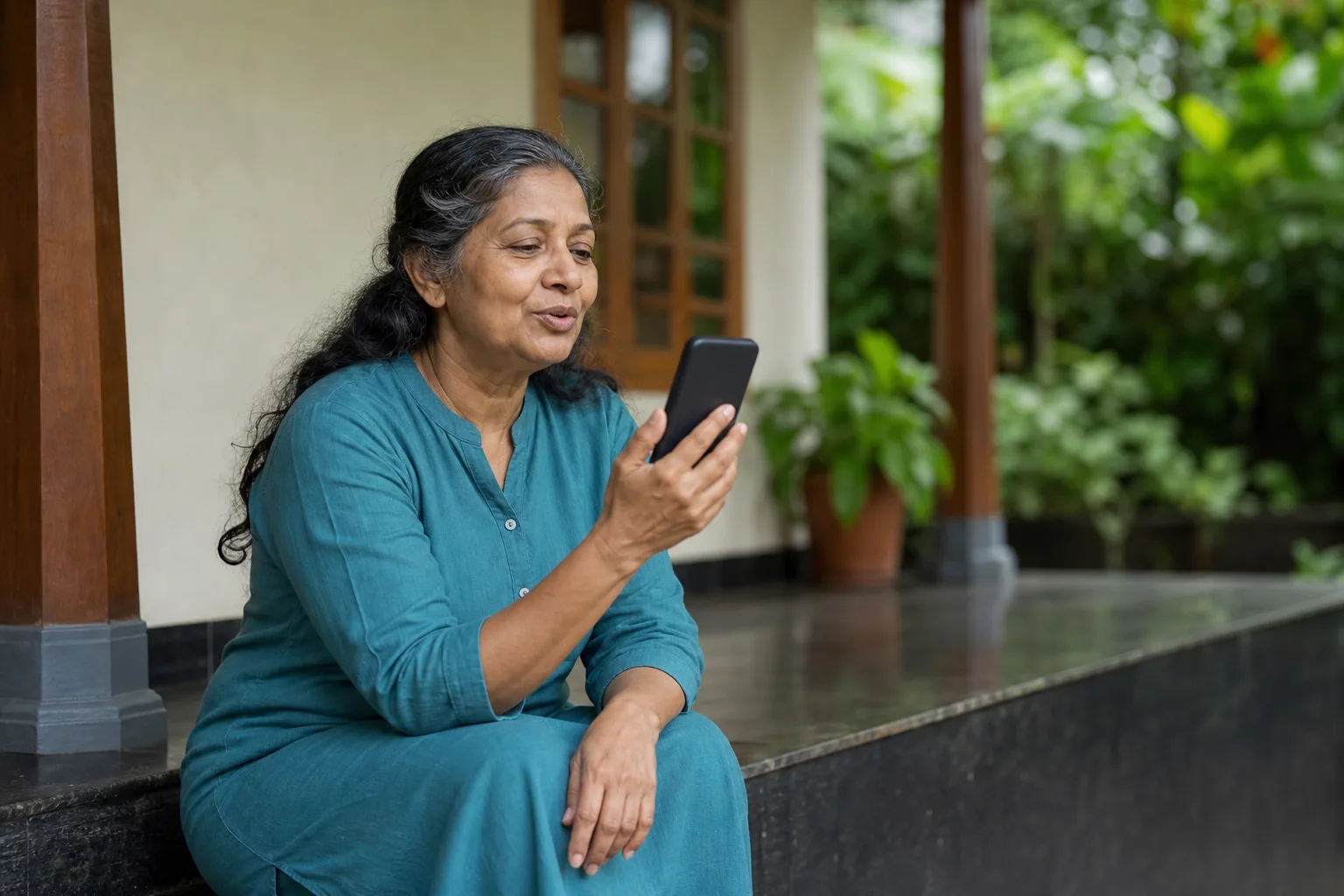
വീട്ടിലെ വരാന്തയിൽ ഫോണിനോട് സംസാരിക്കുന്ന സാങ്കൽപ്പിക വ്യക്തിയുടെ AI സൃഷ്ടിച്ച ചിത്രം.

ടൈപ്പിന് പകരം സംസാരിക്കാം. ഇത് ഉദാഹരണ ചിത്രമാണ്; യഥാർത്ഥ ഉപയോക്താവിന്റെ ചിത്രമോ അനുഭവസാക്ഷ്യമോ അല്ല.

AI ഉപയോഗിച്ച് തയ്യാറാക്കിയ ചിത്രം

രണ്ടും നല്ലതാണ്; പലരും രണ്ടും ഉപയോഗിക്കുന്നു. ദിവസവും ഇംഗ്ലീഷ് അക്ഷരങ്ങളിൽ ടൈപ്പ് ചെയ്യുന്നവർക്ക് മംഗ്ലീഷ് വേഗമാണ്; ഓരോ മലയാളം അക്ഷരവും കീബോർഡിൽ എവിടെയാണെന്ന് പഠിക്കേണ്ട.

ലിപി കീബോർഡിൽ ഓരോ അക്ഷരവും കൃത്യമായി നിങ്ങളുടെ കയ്യിലാണ് — പേരുകളും കവിതകളും ഔദ്യോഗിക കത്തുകളും എഴുതുമ്പോൾ ഒരു ചിഹ്നം തെറ്റിയാലും പ്രശ്നമാകുന്നിടത്ത് അത് സഹായിക്കും.

ടൈപ്പ് ചെയ്യാൻ ഏത് വഴി?
നിങ്ങൾ…ശ്രമിക്കാവുന്നത്
ഇപ്പോൾ തന്നെ മംഗ്ലീഷിൽ ചാറ്റ് ചെയ്യുന്നുEngane ചാറ്റ് ബോക്സിൽ മംഗ്ലീഷ്
ഫോണിലെ എല്ലാ ആപ്പിലും മലയാളം വേണംഫോണിൽ മലയാളം കീബോർഡ്
ലാപ്‌ടോപ്പിൽ നീണ്ട ഡോക്യുമെന്റുകൾ എഴുതുന്നുWindows-ലോ Mac-ലോ മലയാളം ഇൻപുട്ട്
ടൈപ്പിങ് ബുദ്ധിമുട്ടാണ്വോയ്‌സ് മോഡ് — സംസാരിച്ചാൽ മതി

ഏത് വഴി തിരഞ്ഞെടുത്താലും Engane-ന് മലയാളം ലിപിയും മംഗ്ലീഷും ഇംഗ്ലീഷും മനസ്സിലാകും; ഒരേ സംഭാഷണത്തിൽ ഇവ കലർത്താം.

പതിവ് ചോദ്യങ്ങൾ

മംഗ്ലീഷ് മലയാളത്തിലേക്ക് എങ്ങനെ മാറ്റാം?

Engane.AI-യുടെ ചാറ്റ് ബോക്സിൽ മംഗ്ലീഷിൽ ടൈപ്പ് ചെയ്താൽ മതി. ഓരോ വാക്കും പൂർത്തിയാകുമ്പോൾ മലയാളം ലിപിയിലാകും; വേറെ ഒന്നും ഇൻസ്റ്റാൾ ചെയ്യേണ്ട.

മലയാളം കീബോർഡ് ഇൻസ്റ്റാൾ ചെയ്യണോ?

Engane-ൽ ടൈപ്പ് ചെയ്യാൻ വേണ്ട. മറ്റ് ആപ്പുകളിലും മലയാളം വേണമെങ്കിൽ ഫോണിന്റെയോ കമ്പ്യൂട്ടറിന്റെയോ കീബോർഡ് സെറ്റിങ്ങിൽ മലയാളം ചേർക്കാം.

ഇംഗ്ലീഷ് വാക്കുകൾ മലയാളമാകുമോ?

CBSE പോലെ വലിയ അക്ഷരത്തിലുള്ള ചുരുക്കെഴുത്തുകൾ, അക്കമുള്ള വാക്കുകൾ, iPhone പോലുള്ള പേരുകൾ എന്നിവ അതുപോലെ നിൽക്കും. മുഴുവൻ ഇംഗ്ലീഷിന് EN മോഡ് ഉപയോഗിക്കുക.

തെറ്റായി മാറിയ വാക്ക് എങ്ങനെ ശരിയാക്കും?

ആ വാക്കിൽ ക്ലിക്ക് ചെയ്താൽ മറ്റ് രൂപങ്ങൾ നിർദേശങ്ങളായി കാണാം; ശരിയായത് തിരഞ്ഞെടുക്കുക.

കമ്പ്യൂട്ടറിലും ഇത് പ്രവർത്തിക്കുമോ?

പ്രവർത്തിക്കും. ഏത് ആധുനിക ബ്രൗസറിലും engane.ai തുറന്ന് അതേ രീതിയിൽ മംഗ്ലീഷിൽ ടൈപ്പ് ചെയ്യാം.

ഇത് സൗജന്യമാണോ?

ടൈപ്പിങ്ങിന് പ്രത്യേക ചാർജില്ല. അയക്കുന്ന സന്ദേശങ്ങൾ നിങ്ങളുടെ പ്ലാനിന്റെ ദൈനംദിന പരിധിയിൽ വരും.

English

Type Manglish, get Malayalam script in Engane

Finish a Manglish word to turn it into Malayalam script.

Most of us already write Malayalam in English letters — “sukhamano?” on WhatsApp. In the Engane chat box you type exactly the same way. When a space, comma or full stop ends a word, that word turns into Malayalam script: “sukhamano” becomes “സുഖമാണോ”. The last word converts when you send.

  1. Create a free account and open the chat.
  2. Make sure the chat box is in Malayalam (ML) mode.
  3. Type in Manglish: “nale kochiyil mazha undo” (will it rain in Kochi tomorrow?).
  4. Pick the right spelling from the suggestions that appear for the word you are typing, if the first guess is not what you meant.
  5. Send. The reply comes back in Malayalam.

English words stay English

Acronyms, digits and mixed-case names can stay in English.

Even in a Malayalam sentence, abbreviations like CBSE, PDF or NRI and names like iPhone or WhatsApp should stay in English. So some words are left exactly as you typed them:

What converts and what does not
You typeWhat happens
sukhamanoBecomes സുഖമാണോ in Malayalam script
CBSE, PDF (all capitals)Stays as typed
mp3, class10 (with a digit)Stays as typed
iPhone, WhatsApp (capital inside the word)Stays as typed
A single letter (a, I)Stays as typed

To write a whole message in English, switch the EN/ML toggle in the chat box to EN.

Add a Malayalam keyboard to your phone

Add Malayalam through your phone’s keyboard settings.

Illustration of three coloured prompt blocks joining into one clear speech bubble beside a phone.

Give the task, useful context and the format you want. Then ask a follow-up if anything is unclear.

AI-generated visual

To type Malayalam in every app, add Malayalam to your phone’s keyboard. Menu names differ a little between phones.

  • Android: Settings → System → Keyboard (or Languages & input) → your keyboard app → Languages → add Malayalam. Choose a script layout, or a layout that turns English letters into Malayalam.
  • iPhone: Settings → General → Keyboard → Keyboards → Add New Keyboard → Malayalam.
  • Switch languages with the globe key or by swiping the space bar.

Type Malayalam on a computer

Add a Malayalam input source, or use Manglish in the browser.

  • Windows: Settings → Time & language → Language & region → Add a language → Malayalam. Switch with Windows key + Space.
  • Mac: System Settings → Keyboard → Input Sources → Edit → + → Malayalam.
  • Only need it in Engane? Do nothing: open engane.ai in your browser and type Manglish.

To look up a word, the Malayalam dictionary also takes Manglish — search “vellam” and you get “വെള്ളം” (water).

Small tips that help

Correct spellings with suggestions, or use voice when typing is slow.

  • If a word converts wrongly, click it and choose another spelling from the suggestions.
  • Double the vowel for long sounds: “paal” → പാൽ (milk), “veedu” → വീട് (house).
  • If typing is hard work, talk instead in voice mode.
  • You can switch the whole app to English and back with one tap.

Next, read how to chat with AI in Malayalam for questions that get useful answers.

Manglish or a Malayalam keyboard: which should you use?

Choose Manglish for familiar typing or a script keyboard for direct letter control.

AI-generated illustrative photo of a fictional woman speaking toward a phone on a Kerala veranda.

Speak instead of typing. Illustrative scene; the person shown is not a real customer or testimonial.

AI-generated visual

Both are fine, and many people use both. Manglish is quicker if you already type in English letters every day, and you do not have to learn where each Malayalam letter sits.

A script keyboard gives you exact control over every letter, which helps when you write names, poems or formal letters where one wrong vowel sign matters.

Choosing a way to type
If you…Try
already chat in ManglishManglish in the Engane chat box
want Malayalam in every app on your phoneA Malayalam keyboard on the phone
write long documents on a laptopThe Malayalam input source on Windows or Mac
find typing slow or tiringVoice mode — just speak

Whichever you choose, Engane reads Malayalam script, Manglish and English, so you can mix them in one conversation.

Questions people ask

How do I convert Manglish to Malayalam?

Type Manglish into the Engane.AI chat box. Each word turns into Malayalam script as you finish it; nothing needs to be installed.

Do I need to install a Malayalam keyboard?

Not for Engane. If you want Malayalam in other apps too, add Malayalam in your phone’s or computer’s keyboard settings.

Will English words turn into Malayalam?

All-capital abbreviations like CBSE, words with digits and names like iPhone stay as typed. For a fully English message, use EN mode.

How do I fix a word that converted wrongly?

Click the word to see other spellings as suggestions, and choose the right one.

Does it work on a laptop?

Yes. Open engane.ai in any modern browser and type Manglish the same way.

Is typing Malayalam free?

Typing costs nothing extra. The messages you send count toward your plan’s daily limit.

സൈൻ ഇൻ ചെയ്ത് ടൈപ്പ് ചെയ്യൂ · Sign in and start typing

Works in any browser on a phone, laptop or desktop. Or get the Android app:

Get it on Google PlayComing soonApp Store

Published by Thompson Consulting (OPC) Private Limited on 2026-09-26 · updated 2026-09-29. The app and website design, code, text, question banks (Personality, IQ, Career — except the public-domain IPIP personality items), Malayalam translations, lesson and report formats, illustrations, animations, videos and music made for Engane.AI are owned by or licensed to Thompson Consulting (OPC) Private Limited and protected by the Copyright Act, 1957 and international copyright law.

How to Type Malayalam: Phone, PC, Manglish | Engane.AI